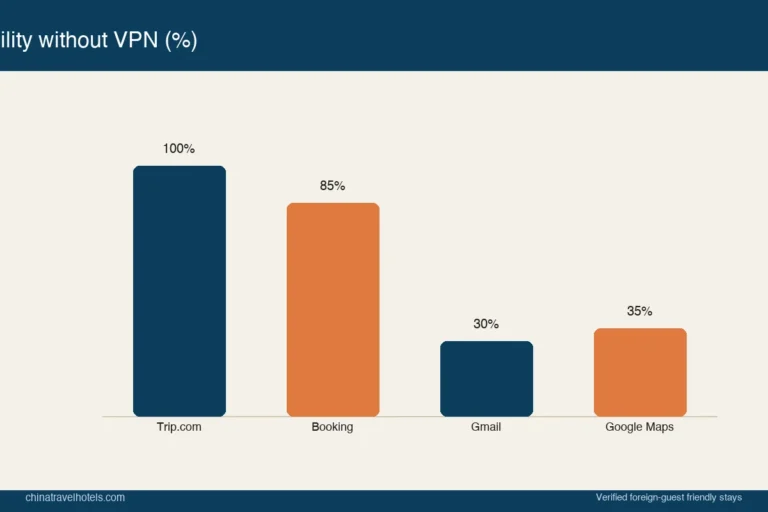
In China, Google Maps barely works and Apple Maps is patchy, so use Gaode (Amap) or Baidu Maps to find and verify hotels — they have the real addresses, metro exits, and street views that foreign apps miss. Download one before you arrive, since the app stores themselves can be blocked on arrival.
The map problem nobody warns you about
The first time I landed in Shanghai, I opened Google Maps to find my hotel and got a blurred, offset mess — half the roads were wrong, and the hotel pin sat a block from reality. China restricts Google services, so Maps and even Apple’s tiles degrade fast once you’re inside the firewall. The locals use Gaode (Amap) and Baidu Maps, and so should you. For finding a hotel’s true location, they’re not optional — they’re the only accurate game.
This matters for bookings because the address on your OTA listing is what the taxi needs, and only a China map confirms the pin is real. Our scam guide stresses verifying the address before paying; a China map is how you do it.
The four apps compared
| App | Works in China | Hotel finding | English | Verdict |
|---|---|---|---|---|
| Gaode (Amap) | Yes, fully | Excellent | Partial | Best overall |
| Baidu Maps | Yes, fully | Excellent | Partial | Great alt |
| Google Maps | Blocked/unreliable | Poor | Good UI | Avoid |
| Apple Maps | Partial | Fair | Good | Backup only |
Setting up Gaode before you fly
Download Gaode from your home app store (it’s on both iOS and Android globally as “AMap”), and pre-load the cities you’ll visit — Shanghai, Beijing, Chengdu. On arrival, switch your phone to a China SIM or eSIM and the offline regions still help. I keep Gaode open even when I’ve booked through Trip.com or Agoda, because the OTA map and the real map occasionally disagree on the building.
For transit to the hotel, the Shanghai Metro site and Beijing Subway site give official line and exit info that pairs perfectly with Gaode’s door-to-door routing.
Finding hotels by location, not just name
When I’m deciding where to stay near the Bund or near the Forbidden City, I drop the candidate hotels into Gaode and check three things: distance to the nearest metro exit, walking time to the sight, and whether the surrounding streets look walkable on the map’s imagery. A hotel “5 minutes from the metro” on an OTA can be a 12-minute slog up a flyover in reality. Gaode settles it.
Sharing your hotel with a taxi
The killer feature: screenshot the hotel’s Gaode pin and show it to the driver, or use the app’s “share” to copy the Chinese address. Taxis rarely read English addresses; the Chinese name from Gaode is what gets you there. I’ve watched foreign travellers fail to reach a booked property purely because they showed a Google Maps pin the driver couldn’t parse.
Offline and VPN note
You don’t need a VPN to use Gaode or Baidu — they’re domestic and fast on local data. A VPN helps for other Western services but not for maps; in fact a VPN can slow Gaode. Keep maps on local data. For group travel, sharing one Gaode list of hotel and meeting pins keeps everyone oriented — see the group booking guide.
Tie-in with transit and station hotels
If you’re on the 240-hour visa-free transit, Gaode helps you confirm your hotel sits inside the permitted region and near your exit port. And when weighing a train-station vs airport hotel, Gaode’s transit routing shows the real transfer time better than any OTA filter.
For official, non-map travel rules, the National Immigration Administration remains the authority; maps handle logistics, government sites handle compliance.
Illustrative app behaviour reflects use through 2026; Last verified 2026-10-26. App features and blockages shift, so download and test before you fly.
A practical setup that never lets me down
Beyond downloading the app, the habit that matters is pre-mapping every hotel before I leave the airport Wi-Fi. I drop each night’s property into Gaode and save it to a list, then screenshot the pin and the Chinese address. The first time I did this was a late Chengdu arrival where the driver spoke no English; one screenshot of the Gaode pin got me to the door in twenty minutes while a fellow passenger arguing with their driver over a Google pin lost an hour. The app also shows which metro exit is closest, which I cross-check against the Shanghai Metro or Beijing Subway official line maps when I am in those cities.
The deeper benefit is confidence about the neighbourhood. Gaode’s street imagery lets me see whether a “central” hotel is actually across a highway from the action, something an OTA filter hides. I have rejected two apparently well-located hotels after Gaode revealed a tedious overpass walk to the nearest sight. For group travel, sharing one Gaode list of hotel and meeting pins keeps everyone oriented without a group data plan. And because Gaode runs fine on local mobile data without a VPN, it is the rare China tool that just works the moment you land — no configuration, no blockage, no surprise.
Finding hotels in smaller cities
The gap between Gaode and Google widens outside the tier-1 cities. In a place like Yangshuo or a county town, Google Maps may show a blank or a wrong road, while Gaode has the guesthouse, its lane, and the scooter-parking spot. When I booked a riverside inn near the Li River, only Gaode could pin it; the OTA address alone would have left me lost among look-alike alleys. I now treat Gaode as essential for anywhere past the big metros, and I save the hotel plus the nearest transport hub as paired pins so a local driver can route directly. The habit takes one minute at booking time and eliminates the most common “where is my hotel” panic I see travellers post about online after a long day of travel.
Offline maps as a backup
Because signal can drop in rural lanes or underground metros, I download Gaode’s offline city packs before I leave Wi-Fi, so the map still renders without data. This saved me in a Guilin village where roaming failed exactly when I needed to find the inn’s lane. The offline pack does not give live traffic but it shows the streets and the pinned hotel, which is all I needed. I pair it with a screenshot of the pin as a final fallback, because a picture needs no signal at all. Google and Apple maps offer nothing comparable inside China, which is the core reason I tell every visitor to switch to a domestic app. Build the offline habit once and you stop fearing the “lost in a Chinese alley” moment that ruins a first day.
Frequently Asked Questions
Q: Will Google Maps work in China at all?
A: Poorly — it’s restricted, so tiles load slowly or inaccurately and navigation fails. Don’t rely on it. Use Gaode or Baidu, which are fully functional domestically.
Q: Do I need a Chinese SIM to use Gaode?
A: Not strictly — Wi-Fi works, but a local SIM or eSIM makes live routing and offline updates reliable. Download the app and city data before you arrive regardless.
Q: Is Baidu Maps better than Gaode?
A: They’re close. Gaode has a slightly cleaner interface and good English-ish labels; Baidu’s imagery is excellent. I keep both and use whichever loads faster.
Q: Can I use these maps to verify a hotel isn’t a scam?
A: Yes — a real hotel has a precise Gaode pin and street imagery. No pin or a mismatched location is a red flag covered in the scam guide.
Q: How do I show my hotel to a taxi driver?
A: Show the Gaode pin screenshot or the Chinese address from the app. English addresses confuse most drivers. This alone prevents a lot of “wrong hotel” stress.
Q: Does Apple Maps work as a backup?
A: Partially, in major cities, but it’s less accurate than Gaode for small streets and metro exits. Fine in a pinch, not as your primary.
Q: Are these maps useful outside mainland China?
A: Gaode and Baidu cover mainland China best; for Hong Kong or Macau use Google or the local apps. The Hong Kong–Macau itinerary notes the switch.